27 May 2016

Update on clothes in store and in shopz

Hey guys! Its amahix here with another post. Today I will show you the new outfits in the store. The woozens got to pick the outfits for this months outfits. Sorry that I have not been posting lately I have been busy with school and homework. Here are some of those outfts:


Here are some items that are in the shopz for a limited time only: 


I hope you guys like all of these outfits as much as i do. If you want any of these outfits you can get them now in the store and the shopz for a limited time only. Next time i will show you more outfits in the store and the shopz. I will see you next time with more fashion. Bye. 


21 May 2016

Beex is Back in the Store Again + Final Fashion Face-Off Voting!

Hey guys!

Woozworld put beex packages back in the store again with the same exact prices as last time!


As well as a Unkiz: Moo5 Head:


20 May 2016

Limited Time Clothes In Shopz + Guess Who's Back?!

Hello Friends! It's Me! "Starlightforever AKA Twilight" coming back to The Woozworld Voice! There is also limited time clothes in Shopz WOOHOO! That's Right Kiddies! On with the post =) 

Example One: 

Example Two: 
These are the two examples I have. I've got to say Woozworld is actually trying hard O_O
Personally I like the Sara Collection.

The boy clothes I actually like. I used to wear boy Clothes <3 Weird fact Number 2
          Woozworld put some items to 200 Wooz and 2,000 Beex (10,000 Beex For Bundles)

                                                                                                                                                                   (THEY'RE PROBABLY RUNNING OUT OF IDEAS)

Anyways, enough about the collection. You may still be thinking why did she post in May instead of March and April?? Well I took a couple week break.
But now Twilight Has Returned!

I promise you I will be posting more <3 Bye Wonderful (=


(Yes I Even Did An Edit) =))  


13 May 2016

NEW MyaWooz and JayWooz Outfits in the Store + Voting is Now Open!

Hey guys!

If you've been following up on the Fashion Face-Off, you'd know that you would be able to vote for either Mya or Jay's outfit designs after they've been released to the store. Well guess what, they're now available in the store! And you can vote for the best outfit right now!

To vote, all you need to do is click on the Fashion Face-Off that's located on the Quest Journal side of the page, and follow the instructions from there.

Voting Unitz

Here' are the outfits in the store and their prices:


Thanks for reading!


11 May 2016

Updates on outfits in the store

Hey guys! Its amahix here. Today i will show you the new outfits in the store and the shopz. The clothes in the store are made for any occasion so you can wear them anywhere you want. Have you ever wanted an outfit in the store and they have nothing that you like? Well now you can buy some things that you actually like. Here are some of them:


Here are all the outfits in the store that i think are cute.

I hope that you guys liked these outfits. Remember to go buy these outfits. there for a limited time only so go buy them fast. I will see you guys next time. Bye


PS: this is my new sign of pic


08 May 2016

Mother's Day Quiz Answers

Hey guys,

Woozworld added a new quiz! This time it's about Mother's Day.


Answers:

1. True
2. Goldie Hawn
3. False
4. Michelle Obama
5. True
6. Marge
7. True
8. No

Prize: 10 wooz and 30 beex.

Hope that helped!


Esq and Sven items hacked???

If you have been on woozin recently, you may have noticed that people have been saying things about esq face and sven items being hacked. 

"Someone hacked a bunch of 'rares'. You can't tell if a particular item is hacked, but it's best to avoid buying them. If the moderation team can track the hacked items, they'll most likely delete them from your inventory once they get this straightened out. The same thing happened with Filis and Evalis a while back which cause them to make it a non-transferable item for now." 

So what should you do about it? Report the hacker (ShopLifter) and don't buy anything that they sell. Hopefully this will end shortly!


06 May 2016

Team Jay? All the way!

Hey beautiful readers! Looks like the latest event is Jay vs Mya, fashion style off! It's just a friendly competition... or is it? Its like captain america civil war, they were friends. Now, something like war?


I love Mya's fashion,
But she probably needs to get a little less-girly,
Jay has sense, 
He deserves the spotlight for once!


So... team Jay all the way! WhAt Do YoU tHiNk? Team Mya, or team Jay! ( i chose Jay because Mya just wants to keep her spot as "resident fashionista". She gets jealous of jay then...)

05 May 2016

Video Of The Week

Hey guys,

this week's video of the week is -drumroll-

Types of Neighbours by Ashleybearr Woozworld

Check out this funny types of video by Ashleybearr!

Take a look at our new channel trailer:

That's all!


04 May 2016

Wacky Wednesday - May 4th, 2016

Hey guys!

It's Wacky Wednesday time! This week we have quite a few items. Nothing too special, though.


03 May 2016

"Dress Your Woozband" Outfit Design Contest

There is a new outfit design contest, this time to design an outfit to "dress your woozband"
(click on image to enlarge)

Good luck and may the best outfits win!


01 May 2016

Beex in Store!

Hey guys,

If you haven't noticed yet, you can now buy up to 54,000 beex in the Woozworld Store! Prices start from $1.99.


30 April 2016

Rivalry between MyaWooz and JayWooz?

Hello, Woozens! June here. When I first logged in to play Woozworld, I saw this on the Wooz Newz:

So, apparently,  MyaWooz is making fun of Jay's style constantly? I don't get what's happening. Maybe they had a fight after the release of the Snapdragon collection? All I know is that I will be on the case!

Stay super!

In regards of writing soon,

Like my new sign off pic? :3


29 April 2016

Snapdragon Collection

Hey guys!

Let me tell you about the Snapdragon Collection


These are what is in shopz so far:
Snapdragon off-the-shoulder sweater, Snapdragon Dress, Snapdragon Tank, Snapdragon Hoodie


25 April 2016

Message to Pixlr users

Hello lovely reader, I have a small announcement to make. 
As you know, I use Photoshop Cs6 to edit. I thought that most things from Photoshop translated into Pixlr but I was wrong. Well here are some translations for my lovely, valid, Pixlr users,

Layer via cut:
To layer via cut on pixlr is a nightmare, because to my knowledge they didnt add the option. Divine being knows why, because we would all benefit from it. To layer via cut on pixlr you have to make your selection, Select ctrl+x on your keyboard, make a new layer, and hit ctrl+v.

Free transform (Transform):
The creators of Pixlr weren't aware that the command Ctrl+T on a WEB BROWSER would open a new tab. In the top bar under 'Edit' the 'Free Transform' option is there.

View:
To hide your layer (extremely useful under the right circumstances) click the check mark on the right of your layer thumbnail.

Inseting things into your image:
Pixlr made this ridiculously difficult. I spent a good 5-10 minutes figuring out the simplest way. To insert something into your image open the image you want to insert, select it with the magnetic lasso tool, ctrl+c and ctrl+v it onto your image.

That's all i could find for now, message my woozen @jamessoup if you've found any more 'translations'. Until tomorrow - Stay creative, my friends.

How to Play: Find the Killer

I haven't posted in so long!
Anyways, i'm back again with another post! "find the killer" (mafia) has been pretty popular the past few days, anyways.. So here are some instructions of how to play this AMAZING game if you don't know how!

First of all, owner secretly picks 1 or 2 killers, 2 polices and one doctor. She privately asks the killer(s) to pick a victim or 2 if there's two killers. This is an example of what would they say: Bella and Anne got killed by the killer, doctor you can only save one person, pc me who to save. The person that the doctor saves, stays in. But sadly, the other person is out. Once there is only 3 people, you do emo or fast type. The person who does it first wins basically. It's a pretty fun game! Once you're definitely sure you got the rules, maybe make your own find the killer! enjoy x.x!

    -Anne (aka kitty)

24 April 2016

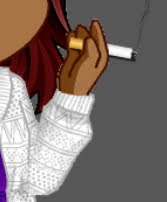
~ Smoking tutorial ~

~**DISCLAIMER**
Smoking is bad and you shouldn't do it. This was more of a subtle nudge of a reference towards 'The Fault In Our Stars' which I just finished reading, and is a metaphor.

In other news: Hello lovely reader! Welcome back to another one of my posts!
Today i'll be doing a tutorial on how to make it look like your woozen is smoking the proverbial cigarette. I don't condone smoking, This is a 'The Fault In our Stars" reference as I said in the above disclaimer.
What you'll need for this edit:
1. A basic understanding of layers
2. Any tool used for cutting or selecting. Preferably one of the lasso tools.
3. A picture of your woozen in the 3/4's view.
4. A picture of a cigarette. You can download the one i used below.
**SMALL EXPLANATION**
To 'layer via cut' right-click (ctrl click for mac) on the selected area.
To select use the magnetic lasso tool.
Depending on which forearm you choose, you'll have to go through more trouble.
**Lets get started, shall we?**

1. with your magnetic lasso tool select a forearm.
You can either choose the left or right forearm. with the left forearm you'd have to patch up the space it left, so i'd go with the right. However, I will be covering both.


3. layer via cut the selected forearm.
Remember that layer via cut is when you right click and select "Layer Via Cut" (Ctrl+click for Mac users)
4. You should now have two layers, one with your woozen on it and one with your forearm of choice.
5. Depending on which forearm you chose, it would be good to stop reading here to do some touch-ups.
Stop here and continue after you've patched up the hole that the left forearm would've left. If you're putting the cigarette in the right forearm ignore this step.
6. With Transform (Ctrl+t, or accessible in the menu under 'edit') position the forearm so that its facing your woozen.

  OR   
5. with the forearm layer selected cut out either:
 OR 
6. layer via cut the selection.
  
7. OPEN picture of cigarette, or download the one i used:
Its already transparent so you don't have to worry about cutting it out, just open it onto your image.
8. Copy and Paste the cigarette onto your image.
9. Place the cigarette between the forearm and hand cut-out layer.
10. Use transform (Ctrl+t, or accessible in the menu under 'Edit') to position it just right.
      
That's all for today. Any questions, feedback, concerns or suggestions? Message my woozen @Jamessoup. Until tomorrow-Stay creative, Lovely.
                   ~James