16 July 2016

How to Edit a Sign-Off Picture

Hey guys! It's Amy here and today I'll be teaching you how to edit a sign-off picture! Sorry for the inactivity. I haven't had any inspiration lately ;-;

So, let's get started with the first method!


1. You will need a basic editor like PiZap or Picmonkey. They can be accessed from the web so you don't need to download anything apart from your final product.


2. Save one of your Woozen photos to your computer. I'm going to use one with a background already because it's faster and there's no advanced editing happening.


Waking Up on a Good Day Like


3. Now open it in your editor! I'm going to be using PicMonkey because it looks cleaner than piZap, I'm just like that XD


4. Now add some text. It should have your Woozen Name and maybe a few sayings, depending on how you want it to be.


5. Liven it up a little by adding some overlays. (Overlays are in the butterfly icon)


(that's not my best work but I'm not really feeling that well so)


6. And save it to your computer! Done!


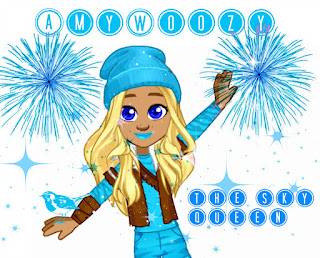
This is just a basic method of editing a sign-off picture but when you get better, you could make sign-off pictures like these: 

That's all for now! Bye!


13 July 2016

🐾 Jenny's Animal Quiz Answers 🐾

Hello, woozens! AnimeLegend here. As you may know, Jenny's Animal Quiz has been released once again this year! The last time it was released was around March, but this time the questions are COMPLETELY different! So today, I will be giving away the answers! Here they are:


Don't forget that you can win an awesome prize of 35 beex and 10 wooz!

Thanks for reading, and see you next time!

10 July 2016

I need your help!+ Acoustic Edit Tutorial

Hello, lovely. I'm back with a new post. However, this isn't a normal post.
In honor of WNS coming back I'm asking for help from the talented woozens who read the blog! I've been having some terrible art block and I need some fresh ideas for tutorials and how-to's. Message me on woozworld @LincolnWoooz (Mind the three o's).
Let's get started shall we?
Today i'll be teaching you a simple edit that's most appropriately categorized as "acoustic". You can choose any acoustic instrument, varying from electric guitars to ukuleles.(The speed edit video)
What you'll need:
  • Basic understanding of the pen tool   
  • Basic understanding of layers 
  •  An image of an acoustic image with a transparent background.
  • A picture of your woozen facing forward.
HOW TO DO IT 


This should be how your layers panel should look initially. Notice how I named each layer. You can name them whatever you want, just don't leave the names as "Layer-(number)".

09 July 2016

Update on Clothes in Store and Shopz

Hey guys! Its Amahix here with another post.Today I will show you some more fashion that has come in the Store. So this week Woozworld has put together some superstar outfits for all of the Woozens. Here are some of the outfits that they have put together for all of us Woozens:


Now here are some Clothes in shopz:


I hope you guys loved these outfits and furniture as much as I do. Be sure if u want any of these items that you get them right now before there gone. Ill see you next week with another fashion update. Ill see you next week. bye.


🎀 WNS 2016 IS HERE! 🎀

NOTE: Sorry for not posting in the past days! I went on a trip in Pennsylvania to visit some family for 4 days, and I couldn't bring my laptop. When we came back our internet went down. Sorry for the inconvinience. 

Hey, guys! AnimeLegend here. And as you may have noticed, WNS is back on Woozworld. And this year, they will be having 2 contests!

- The first contest is between the 4 music labels
- The second contest is between Woozens

For the first contest, all you have to do is vote for your favorite music label! Every member of the Woozband has a music label and its very own superstar

- Mya's label is called Diamond In The Wooz; she works with Jaynelle Woozae (spinoff from Janelle Monae)
- Max's label is called Mixzit!; he works with Skrillooz (spinoff from Skrillex)
- Jenny's label is called IndiZ; we don't know who she works with yet
- Jay's label is called BeatZ; we don't know who he works with yet

Here are some pictures of the two stars we met so far!

 Jaynelle Woozae                                  Skrillooz


And for the second contest, the details will be released on July 15th. All we know is that each label will be holding a young talent contest, where you will be able to show your singing talent. You can get the chance to be signed to one of the labels, and even maybe get the chance to become one of Woozworld's Next Superstars!

Thanks for reading this post! I'll get updated with more news about WNS! See you next time!


06 July 2016

Store Tutorial

Hey guys! I'm going to be doing a Store Tutorial this time.


1. Put in your mannequins in the direction you prefer.


2. Start decorating. Put in some carpets, flowers, all that stuff.


3. Now decorate the walls.


4. Put in some Shop Podz if you have a lot of stuff to sell.


5. Add a centrepiece and you're done!


I hope this helped!


04 July 2016

Introduction

Hi Everyone! It's Amy here and I have been accepted as an official blogger here on The Woozworld Voice! So I am going to introduce myself to you all in 10 sentences.


1. I've been on Woozworld for 5 years.

2. My favourite colour is BLUE!!

3. I have around 12 woozworld accounts. I use most of them for beex xD

4. I've been on many other blogs before and I used to run my own blog

5. I would say I'm not really a girly girl but not that much of a tomboy though my really good friends are boys.

6. I have 4 siblings. I hate them all. -_-

7. I'm on Woozworld quite a lot, but you may not see me around much now cause I mainly just mooch around making Unitz.

8. I think I'm quite mature. I don't say swear words.

9. I AM THE SKY QUEEN AND THE CHIEF WOOZEN-LIFE RUINER. THAT IS MY TITLE.

10. I rule.


So yeah, that's my Introduction post! Next is another Unitz Tutorial!


03 July 2016

4th of July Quiz Answers

Hey,

Happy Independence Day America!


Here are the answers of the 4th of July Quiz:

1. 50
2. George Washington
3. Bald Eagle
4. Drake
5. 2008
6. Baseball
7. Roosevelt
8. Alaska
9. The Star-Spangled Banner


Stay Awesome!
-Zack.

02 July 2016

I'm back! + Gradients 101

Hello, lovely reader. It's me, James. A few things have happened since i've left:

1.) I have a new account. You can add @LincolnWoooz on woozworld.
2.) I've learned a lot of new editing techniques that i'm eager to share with you guys.
3.) I have a youtube channel in which I post speed-edits: My Channel

That's a synopsis of what has happened since my "break". Now into the tutorial:
I'll be talking about gradients!
THESE ARE THE TYPES OF GRADIENTS:

The first gradient is called the "linear" gradient 
The second is called the "circular"-or radial- gradient
How to use them!
To use these gradients you'll need to have a basic understanding of the marquee tool. The marquee tool is a tool that draws out a shape in marching ants. These marching ants serve as a border to confine the gradient into said shape. Here's an example:
Now you can contain these in various shapes, it's all up to imagination. 
**HOW TO BLEND THESE GRADIENTS**
So blending gradients is actually REALLY simple. All you have to do is go into your filter file:
And select "Gaussian blur"
And this is what you're left with! Feel free to apply any of the blurs to your image in any way you feel suitable.


Until tomorrow, Lovely reader.


Unitz Design Tutorial

Hey guys! It's Amy here. I'm going to be showing you how to create a bedroom in Woozworld!


1. Use a suitable Unitz. I think the best unitz for bedrooms are the Lib Street Room, Lib Street Lounge, Lib Street Yard and Lib Street Park.


2. Now it's not a bedroom without a bed, is it? You can buy cute beds from Shopz or Marketplace. Put it close to a corner of your room but not the exact corner. Leave some space on either side for a bedside table, a rug, etc.


3. Place a coffe table beside your bed. It looks neater, doesn't it?


4.  Now put in a rug. It can be in the middle of the room or beside your bed. I used six "Striped Carpets" to form a bigger rug.


5. Now put in a desk! For your own personal needs. Include a laptop and maybe a bookshelf?


6. Add one or two sofas for those visits from your friends. Make sure they look very classy xD    You can put in another coffee table just to decorate.


7. Now you can just start decorating however you like. Put some paintings on the wall, paint the wall and floors a different colour, anything! Be original!


I hope this inspires and helps you to create your own bedroom of your dreams x)


01 July 2016

60K Views Giveaway Postponed

Hey viewers!

We have postponed our 60K views giveaway until we celebrate our 4th anniversary, which takes place on the 19th of July.

If you have already submitted your giveaway participation submission, then you don't have to submit one again as your old one will be counted.

Sorry for any inconvenience.

Regards,
The Woozworld Voice Management Team.